
Arpeggiator with latch
Up, down, as played, random or chords over up to four octaves, with gate and swing. Latch it, take your hands off the keys and ride the filter.
Play it with AI
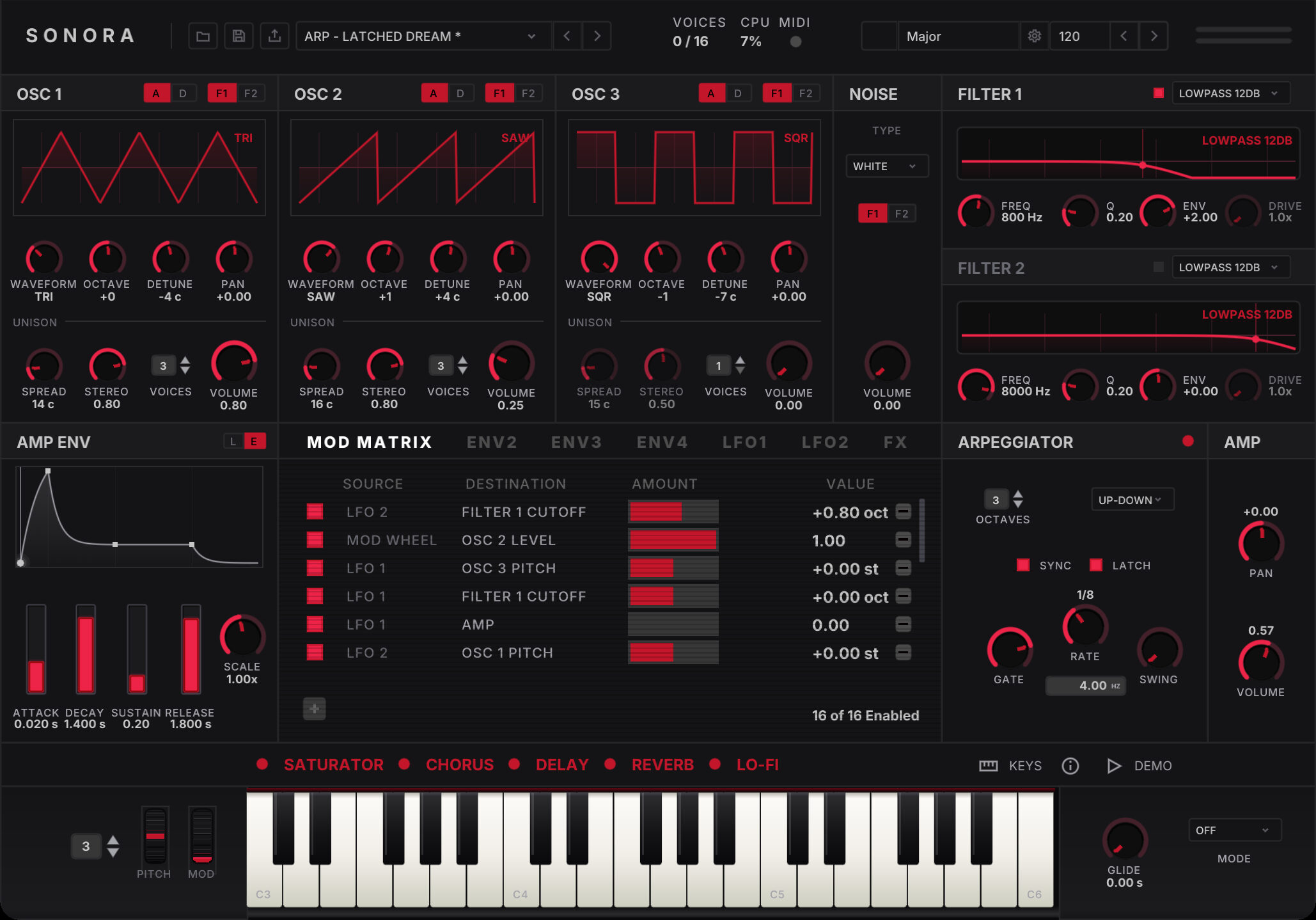
One screen, just play · A polyphonic synth for Mac
Every oscillator, filter, envelope and effect sits on one panel, with no pages and no menus. Load one of 250 presets by Re:Axis, latch the arpeggiator and ride the filter, on its own or inside your DAW.
Standalone app · VST3, Audio Unit and CLAP plugins · Apple Silicon and Intel
01 · Listen
Factory presets, played on SONORA and recorded straight from its output, with nothing added after it.
02 · Live
Don't play keys? Pick a key and a scale in the top bar and the keybed lights up every note in it: major and minor, the seven modes, the pentatonics, blues and whole tone. Improvise without a wrong note in sight.
Up, down, as played, random or chords over up to four octaves, with gate and swing. Latch it, take your hands off the keys and ride the filter.
Glide works polyphonically, on every note or only when you play legato. The pitch-bend and mod wheels respond to the mouse and to your controller.
The LFOs, the arpeggiator and the delay all follow one clock, from 20 to 300 BPM, at divisions from 1/32 up to four bars.
Load a preset, turn every knob at once, open the settings mid-phrase: the sound carries on. Play past sixteen notes and the oldest one bows out without a click.
Turn on Remote control in the settings and SONORA becomes an MCP server. Claude, or any agent that speaks the Model Context Protocol, can play chords and melodies, turn any knob by name, set the tempo, and load and save presets, while the panel follows every move.
03 · Presets
Re:Axis made every factory sound on SONORA itself. There are pads, basses, leads, keys, choirs, arps, rhythms, drums and effects, all ready when the app opens, and any of them is a good place to start pulling a patch apart.
I wanted each sound to feel like I'd patched it on an old poly late at night, slightly unstable and warm, alive under your hands. Nothing got between the idea and the sound, because everything I needed was right there on the panel.
 Re:Axis
Sound designer, SONORA's factory presets ·
Listen on Bandcamp ↗
04 · Interface
The whole instrument fits on one panel, so you never flip pages or dig through menus, and each control stays where your hand expects to find it. Every knob, meter and display is drawn for SONORA alone.
Choose an output and a MIDI source and start playing. You can teach any knob to follow any controller, and the mapping saves itself as you go. If a note gets stuck, one click on Panic silences every voice.
05 · Under the hood
SONORA is tuned to act like analog circuitry: wide and a bit unruly, but never harsh. Follow a note through it, from the first oscillator cycle to the end of the reverb tail.
Each one is analog or digital. Analog plays sine, triangle, saw and square; digital plays one of 32 wavetables, from drawbar organs, vowels, reed and brass to bells, hard sync and folds. All of them are band-limited, so the high notes stay free of digital fizz. Stack up to five detuned copies of each and spread them across the stereo field for the thick, drifting sound of an old polysynth.
Every voice has a noise source you can send to either filter. Use it for breath and air, or for percussion.
Two filters run side by side, each with its own envelope and six shapes, from warm and round to thin and nasal. Turn the cutoff as hard and fast as you like and they stay stable.
Each voice has four envelopes, and two LFOs follow the tempo. A sixteen-slot matrix sends them to pitch, level, pan, cutoff or resonance.
After the amp, the mix goes through a smooth soft clip. Push a dense chord hard and it gets warmer instead of breaking up.
A saturator warms the mix first, then come chorus, delay and reverb, and a lo-fi at the end bounces the lot to worn tape. The delay can run free, lock to the tempo or ping-pong between the speakers. Switch each one on from the bar above the keys.
06 · Who makes it
SONORA is made by Oryon Audio, and we wrote it from scratch: every oscillator, filter, envelope and effect is our own code, and so is the panel around them. That's what lets us tune each stage by ear, and keep the sound steady under your hands.
07 · Requirements
It runs natively on Apple Silicon and Intel and needs nothing else installed. To uninstall, drag the app to the Trash.
08 · FAQ
We haven't set the price yet. The waiting list will hear it before anyone else.
When the beta has had enough hands on it. We're letting the waiting list in first, a few at a time, and we'll email you when it's your turn.
Yes. SONORA is a standalone app and a VST3, Audio Unit and CLAP plugin, so you can play it on its own or load it in any Mac host that takes those formats.
No. Play the three-octave keybed with the mouse or your computer keyboard. Any MIDI keyboard or controller works too, and you can teach any knob to follow any control on it.
Yes. Switch on Remote control in the standalone app's settings and SONORA runs an MCP server. Add it to Claude Code or any MCP client and ask it to play a melody, shape a sound or save a preset. It listens only to this Mac unless you allow your network, and then it asks for a token.
We send invitations from the waiting list in small groups. You get the app and the plugins, and we'd love to hear what you find.
No. SONORA is made for the Mac and runs natively on Apple Silicon and Intel.
We're letting the waiting list into the beta first, a few at a time. Join, and we'll email you when it's your turn.